
AI group chat summary
AI group chat summary is a feature for active groups. After it is enabled, the bot will watch recent group messages and automatically post a summary when enough messages have accumulated.
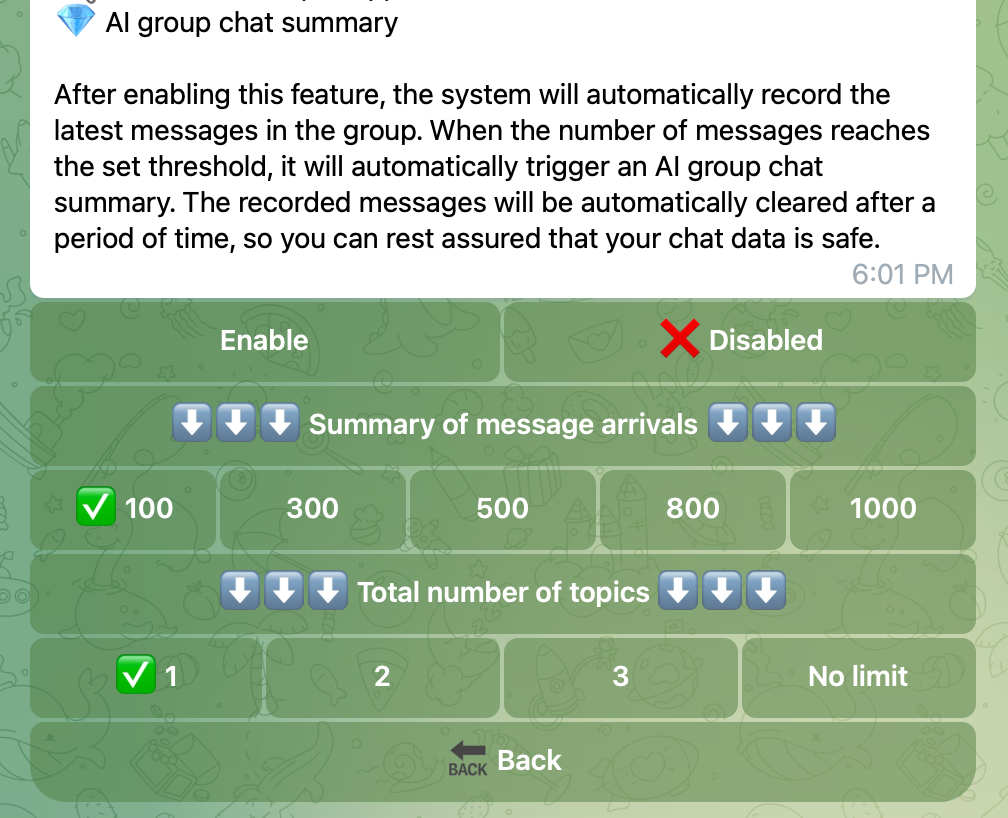
What this feature is
This feature helps group members quickly understand:
- what topics were discussed recently
- what useful points were mentioned
- which members made stronger contributions in the discussion
The bot will generate:
- a topic list
- an AI analysis section
- a contributor score section
How to use it
This feature does not need a member command.
Usage flow:
- The group creator or super administrator enables AI group chat summary in the bot management page
- Members chat normally in the group
- When the configured message count is reached, the bot automatically sends a summary message
What users can do
After a summary appears in the group:
- everyone can read the discussion summary
- members can tap the related button to view personal summary score when available
What can be configured
The group manager can configure:
- whether the feature is enabled
- how many messages are required before a summary is triggered
- how many topics should be shown
- the score range used for contributor scoring
Suitable groups
This feature is especially useful for:
- study groups
- discussion communities
- large topic-based groups
- operation teams that want periodic recaps
Notes for users
- The feature works automatically after it is enabled
- Group members do not need to learn a special command to make it run
- If the group has too little conversation, the summary may not trigger yet